
When businesses hear about integrating artificial intelligence into an ERP system, two opposite scenarios usually come up. The first is euphoria: “AI will clean up the CRM by itself, create customers and close deals.” The second is fear: “A language model will get access to our database, leak trade secrets or accidentally delete half of our contracts.”
In reality, a modern AI agent in a business system (using the Odoo 20 architecture with Gemini as an example) is not a “chatbot with the keys to the database.” It is a clearly isolated pipeline in which the language model acts as a translator from human language into structured commands, while every real action is controlled by the ERP itself.
Below is a breakdown of part of this architecture: the path of a single request from a chat message to a new record in the database, and the security system that works behind the scenes.
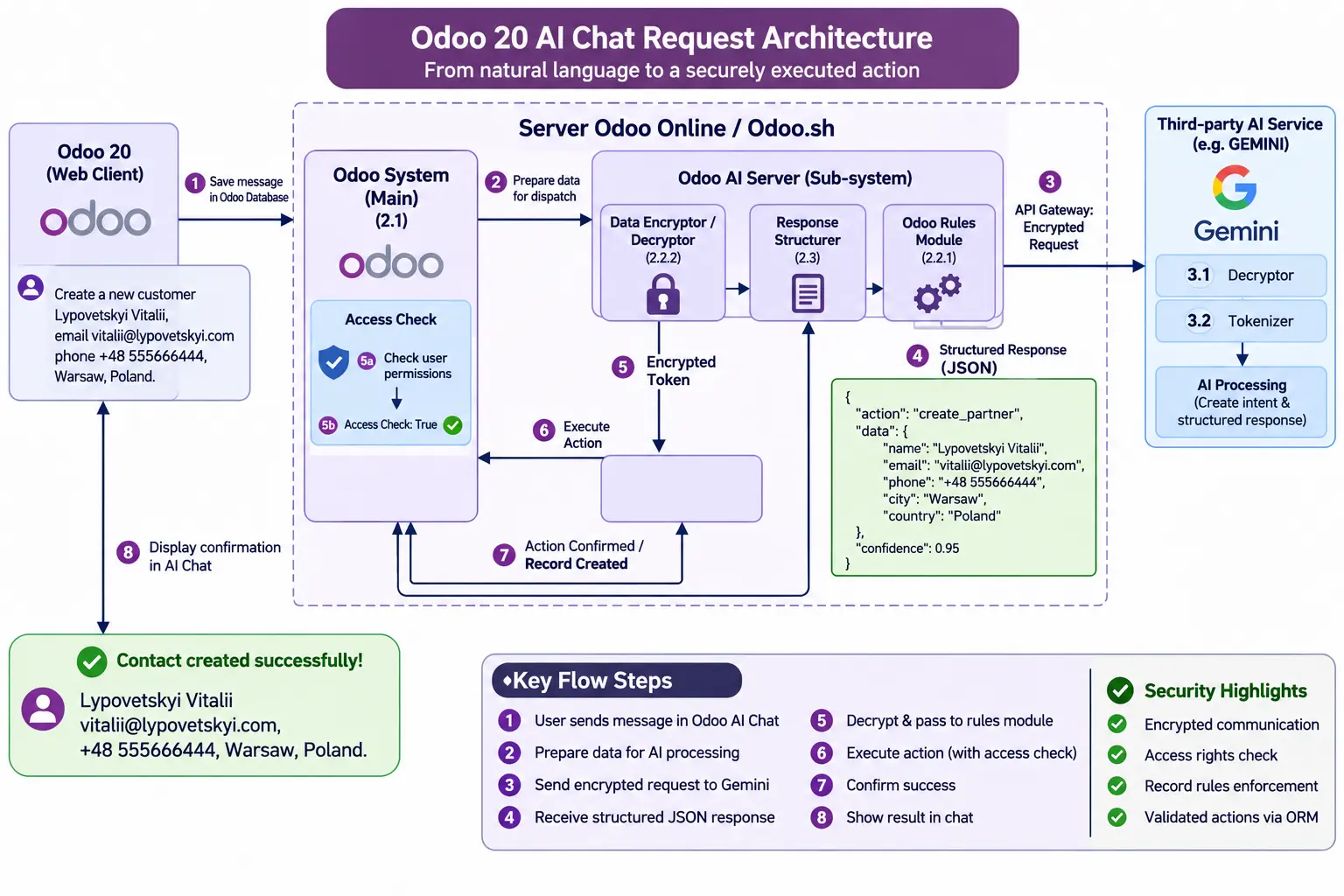
The Path of a Single Request: From Text to an Action in the Database
Let’s take a simple task. A manager types a plain-text message in the Odoo chat: “Create a new customer: Lypovetskyi Vitalii, email..., phone..., Warsaw, Poland.”
Here is what happens under the hood at that moment:
- Recording the request (Odoo Web Client → Main System). The user’s message is first saved in Odoo’s own database. The system records who started the action and when.
- Preparation and routing through an intermediate gateway (Odoo AI Server / Gateway). The request is passed to an intermediate processing server. Depending on the hosting, this can be the standard Odoo IAP gateway (ai.api.odoo.com for Odoo Online) or a dedicated intermediate server or subsystem on Odoo.sh or On-Premise, where the architect has full control over the processing logic. Here the data passes through the encryption module (Data Encryptor) and is prepared to be sent out.
- Intent recognition (Third-party AI Service / Gemini). The encrypted request travels through a secure API gateway to an external language model (for example, Gemini). The model decrypts the package, splits the text into tokens and does exactly one thing: it identifies the intent and extracts the entities.
- Returning structured JSON. The model does not touch the database. It sends back a plain, structured JSON object that clearly states the action (create_partner), the fields (name, email, phone, city) and the model’s confidence level (confidence: 0.95).
- Validation and permission checks. The returned JSON is not executed immediately. It first passes through internal rule filters and access rights checks.
- Execution through the ORM and confirmation. Only when all checks have passed does Odoo perform a standard record creation through its ORM layer and send a confirmation back to the user in the chat. (For updates to existing records, the system by default also asks the user for manual confirmation.)
Why This Doesn’t Turn the Database into a Dumping Ground: The Role of the Rules Module and Skills
One of the main problems of early automation projects was that nobody paid attention to the architecture of checks. Any script or integration could create duplicates, broken records or accidentally overwrite data. Over time, the system piled up a mass of information noise that mixed with real figures and distorted the analytics.
In the Odoo 20 architecture, order is kept by a combination of the standard Skills mechanism (sets of allowed instructions and tools for the agent) and a custom Odoo Rules Module, which on Odoo.sh and On-Premise lets engineers extend the base logic with their own strict rules.
It is a set of business safeguards that stand between what the AI “wants” and the real database:
- Deletion rules: for example, a strict ban on mass deletion of records (even if a user asks for it in the chat, by accident or on purpose).
- Pre-creation checks: data format validation and a duplicate check before a new contact gets into the system.
- Modification rules: restrictions on changing critical fields (for example, bank details or the status of closed documents).
The engineer designs the architecture of requests and checks in advance, even for what seem like routine operations. The AI proposes an action, and the rules system decides whether that action makes sense and fits the company’s business logic.
Three Layers of Security: How Data Is Protected
To keep a business system secure, protection is not built in one place but on three levels at once.
1. On the Odoo Side (Main System)
The AI agent does not run with superuser (sudo) rights. Every action is performed strictly within the permissions of the specific user who wrote the request (Access Check). If a manager has no right in Odoo to create partners or view the payroll, the AI agent cannot do it either. This relies on the access rights system updated for Odoo 20 (Access Rights with record filtering domains).
2. On the Intermediate Gateway Side (Odoo AI Server / Gateway)
Between the ERP core and the outside world sits an intermediate processing layer. It is responsible for encrypting packages (Data Encryptor / Decryptor), structuring responses (Response Structurer) and applying business rules. Even if the external service returns an incorrect or potentially dangerous structure, the Response Structurer and the rules module will cut it off before it reaches the main database.
3. On the External AI Service Side (Gemini) and Log Storage
Data exchange between the Odoo infrastructure and the Gemini API runs over secure encrypted protocols (TLS). There is one important architectural nuance.
At the level of the intermediate gateway and the AI provider, request data travels in encrypted form solely for one-time processing and tokenization. It does not stay on intermediate servers and is not used by the external provider to train its models.
Inside the Odoo 20 database itself, the history of conversations with the AI agent is kept for up to 30 days after the last message, only within the customer’s own system, for control, audit and user convenience.
What Stays Behind the Scenes (and What We Will Cover Next)
The diagram above shows only the basic flow for processing a single request, not the final stage of the system’s development. Many important questions remain outside this diagram, and work on them is ongoing:
- The fine legal and GDPR mechanics: how exactly compliance for European businesses is regulated at the level of the provider’s contracts and protocols (Odoo / Google). This is a separate topic, where many details remain the vendors’ own “secret ingredient.”
- Complex multi-step scenarios and context: how the agent behaves when a task requires not one CRM record but a chain of actions, such as checking stock levels, issuing an invoice and getting multi-level human approval (Human-in-the-loop).
The main takeaway is simple: effective AI in business does not start with choosing the smartest model. It starts with the architecture of constraints and rules around it. That is what turns a chat experiment into a reliable working tool.